For the current BusAlarm app · Checked 5 November 2026
Start with a saved journey
Route Club credits routes that you choose to save. It does not award points just for opening the app, viewing a map or setting a destination. Each route is credited once, so repeatedly opening the same saved journey does not award its distance again. Existing saved routes can establish your starting progress when the feature is first used.
- Open Settings and enable Save my routes under Your journeys.
- Complete a journey that is saved in BusAlarm.
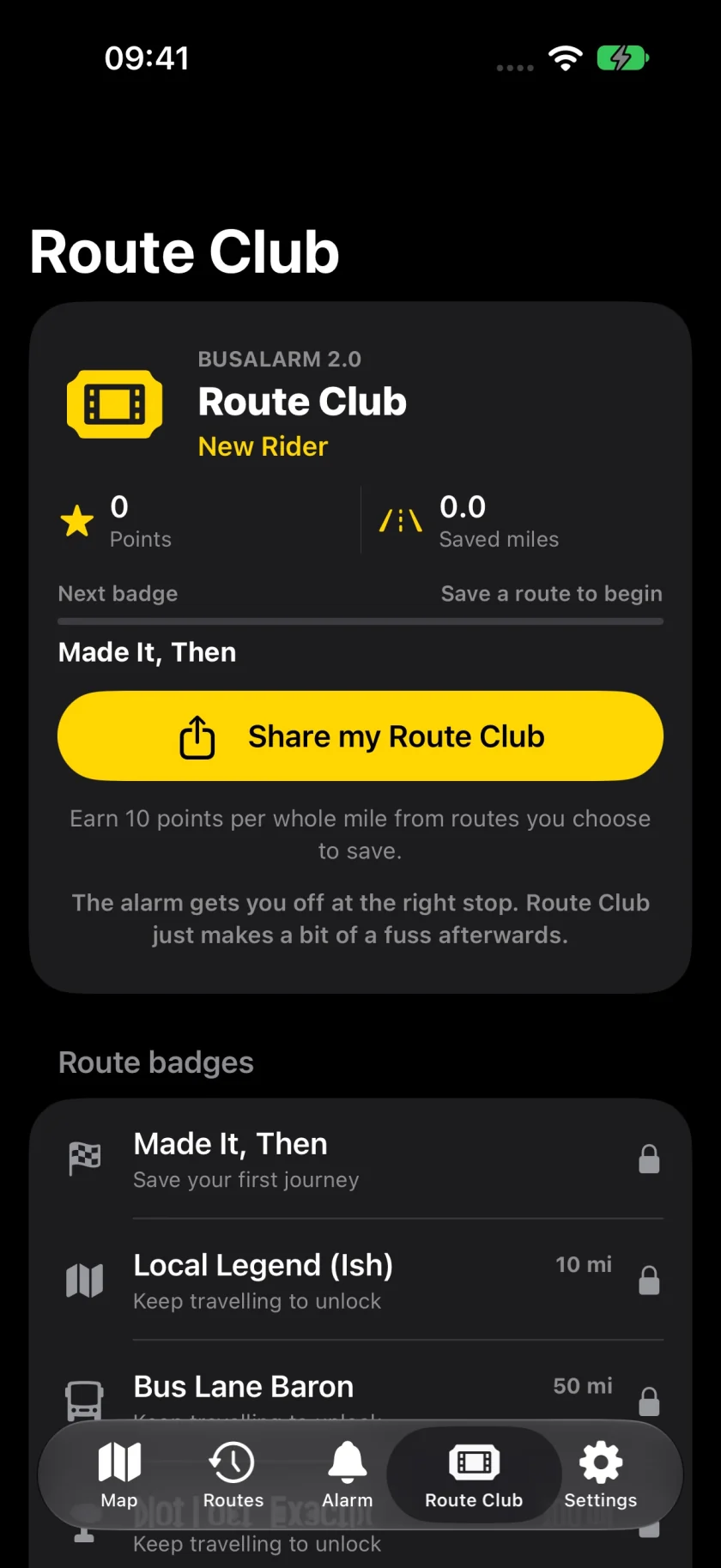
- Open the Route Club tab to see Points, Saved miles, your current title and Next badge.
How miles and points work
You earn ten points per whole saved mile. Fractions carry forward across saved journeys, rather than being discarded after every short trip. Route Club displays its mileage and milestone requirements in miles even if you choose kilometres elsewhere in the app.
The Next badge panel shows the next milestone and progress towards it. Your current title follows your highest earned milestone. The first badge comes from saving your first journey; later milestones are based on accumulated saved distance.
Explore and replay your badges
Replaying a celebration does not add miles, create another route or award more points. Review the share preview and chosen recipient before sending. Sharing an achievement is optional and does not unlock another entitlement.
- Scroll to Route badges in the Route Club screen.
- Check the lock or unlocked indicator and the mileage requirement beside a badge.
- For an earned badge, tap its party-popper button to replay its celebration.
- Use its share icon to share that badge, or Share my Route Club near the top to share your overall progress.
Choose a roadie and celebration style
Roadies include characters such as Ticket Tess and Tea-Run Theo, with more becoming available as you save miles. Their role is in the app’s cosmetic celebrations. Your chosen roadie can also appear in a shared Route Club card.
- Scroll to My roadie locker.
- Tap an unlocked roadie to select it. A green checkmark identifies the chosen roadie; locked entries show the mileage needed.
- Scroll to Celebration styles and tap an unlocked style.
- Look for the selected checkmark. Your style changes the trophy and confetti used for a new badge.
Why deleting a route keeps your badge
Route Club stores credited route identifiers and accumulated progress separately from the list on the Journeys screen. Deleting an individual route frees a saved-route space without taking away its earned points, mileage or badges. That is why a shorter current saved-route total can coexist with a larger Route Club total.
There is no separate Route Club reset button in the current version. Its data is local, and backups can retain it. Restoring Pro does not restore a lost Route Club history from a company account.
If progress is not increasing
- Check that a new journey was actually saved and that Save my routes was enabled.
- Check the ten-route free limit. A route that was not saved cannot contribute new saved-route credit.
- A very short trip may add fractional mileage without immediately crossing the next whole-mile point threshold.
- Revisiting an already credited route or replaying a celebration does not count as a new journey.
More for your journey
Something still unclear? Contact BusAlarm support.